
Image Model Comparison

GPT Image 2 vs FLUX.2: Which AI Image Model Is Better for Production?

A practical comparison of GPT Image 2 and FLUX.2 across editing, typography, multi-reference workflows, photoreal direction, and real production use cases.

A cinematic science-fiction scene used to frame a GPT Image 2 versus FLUX.2 comparison

Guide Summary

This comparison is for teams choosing a production image stack, not hobbyists scoring isolated samples. The right answer depends on whether you need the simplest current OpenAI-native workflow or a specialist family that leans harder into multi-reference control.

Main keyword: gpt image 2 vs flux 2

Model Snapshot

There is no universal winner. GPT Image 2 is the cleaner default when you want one current OpenAI image model. FLUX.2 becomes more attractive as your workflow grows more reference-heavy, composited, or vendor-specific.

Best For

GPT Image 2

The best choice when you want a current OpenAI-native image workflow with strong editorial ambition, practical editing, and a simpler decision tree.

Marketing creatives, typed assets, editorial layouts, and teams already standardized on OpenAI tooling.

Strengths

  • OpenAI currently positions it as the flagship image model for fast, high-quality generation and editing.
  • OpenAI's launch examples suggest real emphasis on posters, brochures, notebook visuals, and other layout-sensitive assets.
  • A cleaner one-model starting point for teams that value simplicity as much as raw capability.

Tradeoffs

  • Less explicit vendor messaging around deep multi-reference composition than FLUX.2.
  • You still need strong prompt structure if the brief involves typography, strict brand rules, or careful hierarchy.

Best For

FLUX.2

The strongest option when reference handling, image compositing, and a broader specialist model family matter more than having a single default answer.

Product composites, reference-heavy edits, photoreal setup work, and teams comfortable tuning model-family choices.

Strengths

  • Black Forest Labs positions FLUX.2 as the current flagship family for new projects.
  • Official docs emphasize multi-reference editing, color control, and up to 10 input images.
  • The family gives production teams more room to optimize for premium quality, speed, or cost by job type.

Tradeoffs

  • A bigger model family can mean more internal choice paralysis before a team settles on one house workflow.
  • If your broader product stack is already OpenAI-led, another vendor can introduce extra operational complexity.

Best For

FLUX.1 Kontext

Still a familiar benchmark in public discussions, but now more useful as context than as the primary recommendation for a fresh workflow.

Teams that already prototyped there and need continuity while they evaluate whether to move to FLUX.2.

Strengths

  • Still useful to know because many readers and buyers continue to mention Kontext when discussing image editing workflows.
  • Helps explain why multi-reference and edit-centric conversations often cluster around the FLUX ecosystem.

Tradeoffs

  • Black Forest Labs now points new projects toward FLUX.2, which makes Kontext less strategic as a starting point.
  • A previous benchmark is harder to justify if you are standardizing a fresh production stack in 2026.

Three Benchmarks That Matter In Real Evaluations

When teams compare image models seriously, they rarely look at only one aesthetic. They test realism, typography-heavy composition, and stylized world-building because production work usually spans all three.

A cinematic photoreal scene used to benchmark modern image-model realism

Photoreal Atmosphere

Cinematic realism is still table stakes for many product and campaign teams. A frame like this helps evaluate lighting behavior, believable surfaces, and how confidently the model handles negative space.

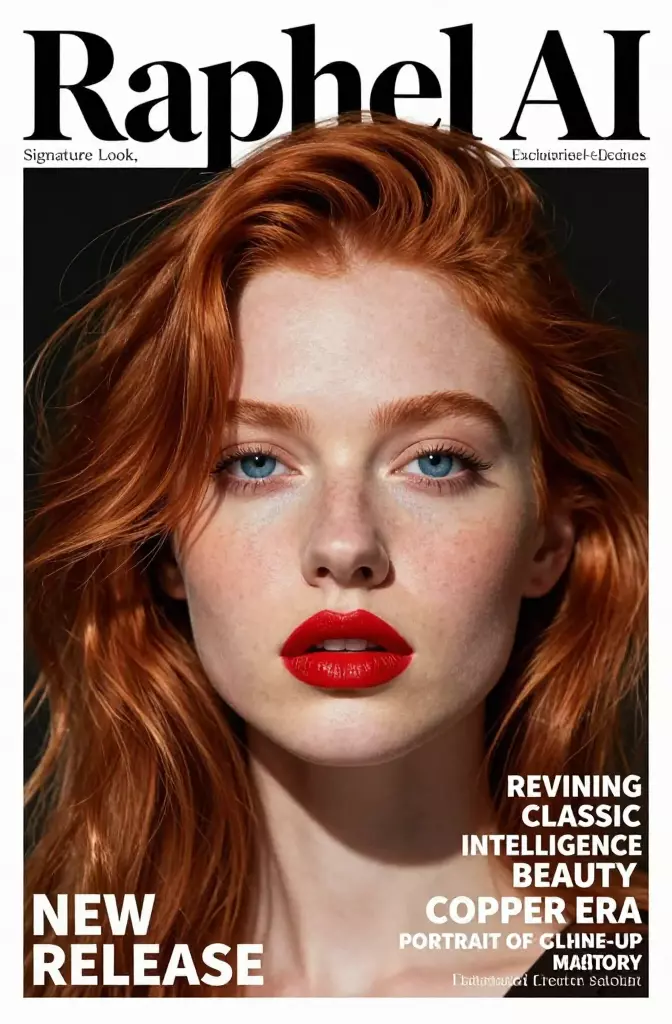
An editorial cover used to benchmark typography and portrait quality in image models

Portrait Plus Typography

This kind of cover mockup puts pressure on face quality, text placement, and visual hierarchy at the same time. It is one of the clearest ways to separate a fun model from a useful one.

A stylized pixel-art fantasy scene used to benchmark image-model range

Stylized Range

A production-ready model should not collapse when you leave photorealism. Stylized outputs reveal how well the system can preserve shape language, color rhythm, and scene readability in non-realistic directions.

How To Use This Workflow

  1. 1. Map your dominant workload

    Decide whether you mostly produce typed marketing assets, cinematic key visuals, product composites, or reference-heavy edits. The answer tells you more than a generic beauty contest ever will.

  2. 2. Ask whether multi-reference work is core or occasional

    If multiple reference images are central to the workflow every week, FLUX.2 deserves serious weight. If they are occasional, GPT Image 2 may still be the simpler standard.

  3. 3. Choose the stack that lowers team friction

    The best model is the one your team can brief, iterate, review, and ship with repeatedly. Operational fit matters just as much as isolated output quality.

Quick answer

If you want the shortest recommendation, choose GPT Image 2 when you want one current OpenAI-native model that can handle both generation and editing without a complicated decision tree. Choose FLUX.2 when reference-heavy editing, compositing, and model-family-level control are central to your workflow.

That means neither model is the universal winner. They optimize for different types of certainty. GPT Image 2 optimizes for a cleaner default. FLUX.2 optimizes for deeper specialist control.

  • Choose GPT Image 2 for editorial assets, poster-like work, and teams already using OpenAI tools.
  • Choose FLUX.2 for product compositing, multi-reference jobs, and workflows that need more explicit control over several inputs.
  • Keep DALL-E 3 or FLUX.1 Kontext mainly as context benchmarks, not as the first recommendation for a new stack.

Where GPT Image 2 wins

GPT Image 2 is strongest when the creative team wants one current OpenAI image model that feels modern, capable, and straightforward to operationalize. It is especially compelling for marketing creatives, editorial assets, and visual direction work that benefits from strong instruction following without introducing too many product-level choices.

Typed and editorial assets

OpenAI's own examples keep returning to posters, notebook pages, brochure-like layouts, and other composition-heavy deliverables. That makes GPT Image 2 especially interesting for teams creating usable brand assets rather than only dramatic art pieces.

Simple stack for generation plus edits

A simpler product story matters in practice. Teams move faster when they can align on one default model, then spend their energy on briefing and review instead of internal model debates.

Better fit for OpenAI-heavy teams

If the rest of your product workflow already depends on OpenAI tools, GPT Image 2 reduces context switching and lowers the number of moving parts your team has to manage.

Where FLUX.2 wins

FLUX.2 becomes more compelling as soon as reference handling stops being a niche need and becomes a core part of the pipeline. Product marketers, fashion teams, ecommerce studios, and interior-composite workflows often care more about reference blending, color control, and controlled edits than about having the simplest default answer.

Multi-reference editing

Black Forest Labs explicitly emphasizes multi-reference input and edit-centric control in the FLUX.2 family. That matters when your brief depends on several products, poses, colorways, or brand references landing in one coherent image.

More workflow knobs for larger teams

Premium, pro, flex, and other variants can be a burden for a small team, but for a larger production organization they can also be a feature. Different jobs can justify different quality, speed, or cost tradeoffs.

Photoreal product and setup work

When the goal is a polished product composite or a tightly controlled photoreal scenario, specialist reference handling often matters more than having the simplest model menu.

What about FLUX.1 Kontext and DALL-E 3?

Readers still search for FLUX.1 Kontext and DALL-E 3 because both names became shorthand for earlier phases of the image-model market. They still matter as comparison anchors, but neither is the cleanest starting point for a new evaluation in 2026.

Kontext remains useful for understanding why the FLUX ecosystem is associated with edit-centric workflows. DALL-E 3 remains useful because many buyers still want to know whether OpenAI has truly moved beyond its older image model generation. In both cases, the more current answers are FLUX.2 and GPT Image 2.

Which model should a marketing team choose?

If the team mainly makes campaign posters, brochure-style visuals, title cards, social creatives, and concept frames, GPT Image 2 is the stronger first choice. The official OpenAI positioning and launch examples both suggest a serious focus on usable, layout-aware assets.

If the team often combines product shots, multiple references, controlled recolors, and more complex edit scenarios, FLUX.2 deserves the edge. It is built for a more reference-intensive creative process.

Which model should a video team choose for upstream assets?

Video teams should ask a narrower question: which model helps us make better references before motion starts? GPT Image 2 is often the easier recommendation for title cards, poster directions, moodboards, and storyboard frames because it fits a broad creative brief without much workflow ceremony.

FLUX.2 is better when those upstream assets need heavier compositing or several source references blended with more control. In other words, GPT Image 2 is the simpler visual-planning engine, while FLUX.2 is the stronger specialist when input complexity becomes the job.

FAQ

Is GPT Image 2 basically a DALL-E 3 replacement?

For most fresh evaluations, yes. OpenAI now frames DALL-E 3 as a previous-generation image model, while GPT Image 2 is the more current model to benchmark first.

Is FLUX.2 better for image editing?

It often will be when the workflow depends on multiple references, controlled composites, or more explicit vendor-level control over inputs. That is where FLUX.2 has the clearest edge.

Should I still evaluate FLUX.1 Kontext?

Only if your team already prototyped there or your buyers keep asking about it. For a fresh 2026 evaluation, FLUX.2 is the more strategic benchmark in the Black Forest Labs ecosystem.

Which model is better for marketing creatives?

GPT Image 2 is usually the stronger first choice for posters, brand visuals, editorial layouts, and other assets where usable composition and clearer text handling matter.